A Guide to Alt Text
By @neatnik
This is a simple guide to alt text. It explains what it is, how it works, and how to write it.
What is alt text?
Alt text, or alternative text, is content that is offered alongside any visual media shared on the web. Alt text is commonly provided with images, but it can also be provided with other visual media, such as videos.
Why is alt text important?
When you share an image or other visual media online, it’s easy to assume that other people will see it the same way that you do. But what about people who have a visual impairment, or who are blind? They can’t see your image the same way you do, or they may be unable to see it at all.
Providing alt text with your media offers people another way to experience it when they can’t do so visually. Alt text can also be helpful to sighted people who need a different (written) perspective. Sometimes the written context can be really helpful.
Alt text is an equalizer: it takes a situation that would otherwise be unequal (like an image being shown to someone who can’t see it) and transforms it into a situation where everyone has access to the information being shared. And these kinds of equal experiences are inclusive experiences. And everyone wants to be included!
How does alt text work?
Different web browsers and assistive technologies can work in different ways, but in general alt text is presented to people in whatever context it’s needed. For example, someone reading your content with a screen reader will hear your alt text read aloud to them in place of where the image or video would normally be shown. On Mastodon, anyone can read alt text by clicking the ALT label on any image or video.
Who writes the alt text?
You do! Alt text is your own content, just like a Mastodon post or the media that you attach to it. It’s your opportunity to describe what you’re sharing.
How do I write good alt text?
It’s really not hard at all. The first step is to not overthink it.
Take a look at the media you want to share, and think about what’s going on in it. Consider the main part—the part that stands out and catches your attention the most. Whatever that is, describe it! Then consider the next thing that you notice about the image (perhaps some of the smaller details). Describe those! And then you’re finished.
That’s right. There isn’t too much to the process, and it doesn’t take long at all.
Consider this example image:

It’s easy to notice all of the detail here, and it’s tempting to want to describe all of it. But that’s not really necessary! It’s fine to just consider the main and supporting details and share those. For example:
A white goose leaning forward and peering curiously at the viewer, with another goose in the background. Both stand on a rocky shore beside a small lake.
That’s it! This alt text describes what’s shown in the photo. It captures the main details and some supporting ones, too. Does it offer a thorough description of every possible facet of the image? No, and that’s intentional. A picture may be worth a thousand words, but when it comes to alt text nobody has time to wade through a thousand words when a handful will do. I could have described the geese in significantly greater detail, or delved into the types of rocks and their specific arrangements, or noted the color of the water, mentioned the trees in the background, or pointed out the blue sky and clouds. But if you squint at the picture and take in the full scene briefly, it’s clearly about a goose peering at the person who took the photo. With another goose in the background. Near a pond. And that’s the gist of it, so that’s my alt text.
Here’s another example:
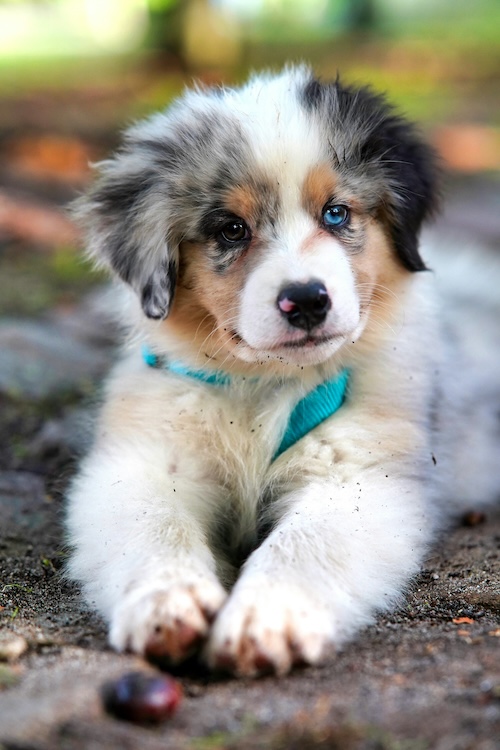
I’m just going to follow the same approach as before. What’s happening here? What do you notice first, and what do you notice after that? Describe those things, and that’s the alt text. For me, that looks like this:
An adorable puppy with fluffy white, brown, and gray fur lays on the ground outside. It has one brown eye and one blue eye, and a black nose with a pink spot. Bits of dirt are visible in its fur, as if it was just rolling around.
Easy peasy. This one was all about this one puppy. And I could write an entire book about this puppy, but there’s no need! A simple description will do.
Here are some key takeaways:
- It’s OK to be brief. Writing good alt text isn’t about being the thoroughly descriptive; it’s about conveying the image simply and efficiently. Less is often more. What you say is always going to count for more than than how much you say.
- It’s OK to use your own voice. Your alt text is your own content, and so you should use your own words and describe things the way that you would describe them! Your alt text shouldn’t be sterile or clinical, or devoid of personality. Describe what you see in your own words. I used words like “curiously” and “adorable” in my alt text, and that’s A-OK. You can express opinions in your alt text, especially if it helps someone understand what’s being shown.
- It’s OK to be imperfect. You’re not curing disease or solving world peace here. You’re just describing what you see. That is always going to be a subjective process, and that’s fine. The effort matters more than anything, and no good will come from striving for perfection. Just describe the media and click upload. You’ll do great.
Further Reading
This guide is just one guy’s approach to writing alt text. Like any kind of content, there are as many approaches and preferences as there are people in the world. Here are some other resources you can explore to learn how others approach writing alt text:
- Write Alt Text Like You’re Talking To A Friend
- Alt Text Hall of Fame
- Alternative Text (WebAIM)
- Alt Text: What to Write (Nielsen Norman Group)
- How To: Write Good Alt Text (Supercool)
- Writing Effective Image Descriptions or "Alt Text" (American Foundation for the Blind)
- An author’s guide to writing good alt text (Taylor & Francis)
- Writing Better Alt Text (NC State University Libraries)
- Write helpful Alt Text to describe images (Harvard University Digital Accessibility Services)
alt-text.social.lol